- AI with ALLIE
- Posts
- How to build your first Claude Skill
How to build your first Claude Skill
Non-engineers: I need you reading this immediately

Allie K. Miller
December 15, 2025

AI with ALLIE
The professional’s guide to quick AI bites for your personal life, work life, and beyond.
TLDR:
Claude Skills are zip files with instructions that tell Claude how to do something your way - and they work across every conversation you have. If you keep re-explaining the same workflows, preferences, or analysis processes to your AI, you need to create a skill. And no, you don't need to know how to code.
Why I love Claude Skills, and why you should too
In my role as a Fortune 500 AI advisor, I am very often asked to come in and play ‘private eye’. I go full detective mode, analyzing the company, speaking with AI leadership and C-Suite, meeting with board members, scanning through public records… and at the end of it, my goal is to provide the company with an AI Executive Assessment. As part of that detective work, I also provide a score card to the company so they can see just how AI-first they are (I call it the “AI-First Index”). And for better or worse, it’s actually a moving target. What was bleeding edge a year ago is table stakes today. And I needed a fast way of not only iterating on this score card, but getting it out to companies as fast as humanly possible.
So I built a Claude Skill that does just that. And it’s called the ‘AI-First Index Assessment’. That Claude Skill has over 700 lines of directions, code, analysis processes, templates, resources, and examples (note that Anthropic recommends less than 500 lines as a best practice). It lets me score exactly how AI-First a company is in minutes, and then I spend about 1-2 hours reviewing and editing. What used to take me a week now takes me under 3 hours to pull all the context together, run the skill, review, and edit. It's heavenly, truly.
And I want you to have this power too. So let me break down what they are, bust some myths, and give you a step-by-step to build your own.

Claude Skills can be found in Settings > Capabilities > Skills
Claude Skills Are Not Just For Engineers
First, let's bust some myths on Claude Skills.
Myth 1: Skills are difficult and filled with code. Nope. A skill can literally just be a zip file with some structured information. You don't need to write a single line of code AND Claude can write it all for you. Non-engineers, you are welcome into the world of Claude Skills with open arms
Myth 2: It takes forever to come up with a use case. My sweet friends, just go to a thread you’ve already been chatting with Claude. If you’ve asked Claude to do a task once that you want to do many times over, you’re just going to ask Claude to turn it into a skill for you. More on this later in the newsletter.
Myth 3: I'll never be able to use a Skill. Start with the ones made by Anthropic and already built in. Claude comes prepped with skills for Excel, PowerPoint, Word, PDF, and Design. Ask Claude to run an analysis and give you a spreadsheet with 5 columns you didn’t ask for. Ask it to summarize your favorite book into a pirate-themed PowerPoint deck. Watch it actually ‘call’ the skill in the conversation so you can get a feel for how it works.
What Is a Claude Skill?
A Claude Skill is a folder with at least one markdown file called SKILL.md (a markdown file is written in plain text with no bolding or bullets or anything). That's it. You can also include reference docs, examples, or code scripts if your workflow needs them. The folder structure can look like this:
my-skill/
├── SKILL.md (required - your instructions)
├── references/ (optional - docs Claude can read)
├── scripts/ (optional - code Claude can run)
└── assets/ (optional - templates, images, etc.)
Or here’s a more thorough example for a PDF Processing skill:
pdf/
├── SKILL.md (main instructions - loaded when triggered)
├── FORMS.md (form-filling guide - loaded as needed)
├── reference.md (API reference - loaded as needed)
├── examples.md (usage examples - loaded as needed)
└── scripts/
    ├── analyze_form.py (utility script - executed, not loaded)
    ├── fill_form.py (form-filling script)
    └── validate.py (validation script)
The SKILL.md file has two parts: a little YAML header at the top (just the name and a description of when to use it) and then your actual instructions in markdown below. Let me repeat that with zero tech jargon: you’re going to create a folder with a really boring how-to document with some helpful descriptions and your AI friend Claude will be able to read it and do stuff with it.
The Fastest Way to Build a Claude Skill
You know the one thread you keep going back to? The one where Claude just GETS it after weeks of built-up context? I call this my ‘golden child thread’ and I used to scroll back into my chats to track them down. Well, Claude Skills let you capture that same golden child magic and use it everywhere. Instead of one golden child thread, every thread can become the golden child. Alright this is sounding weirdly religious, so let’s keep it moving.
Go into your golden child thread, and paste this into your chat:
"Please use your skill that builds other skills and turn this entire chat thread and the main task into a Claude Skill. Be sure to include the SKILL.md file and all necessary code, templates, examples, and resources. If necessary, find additional resources online, including best practices and reference points."
That's it. Claude will make everything for you and package it all up for you too. Download the output, zip the folder if it isn't already (right-click and hit ‘compress’), and upload it into Claude by going to Settings > Capabilities > Skills > Upload skill.

Note: Make sure that “skill-creator” is toggled on. Find it under Settings > Capabilities, then scroll to the Skills section. This allows Claude to make its own skills for you.
Building a Claude Skill From Scratch (Still Very Easy!)
If you want more control, create a new folder on your computer. Inside of that folder, create a new file titled SKILL.md. At the top, add this YAML header. Just paste in:
---
name: my-skill-name (max 64 characters)
description: A clear description of what this skill does and when Claude should use it (max 1024 characters)
---
Don’t just write “hey Claude, help me with PDFs” as your description. Be clear and concise. Here are some example descriptions:
For a PDF Processing skill: Extract text and tables from PDF files, fill forms, merge documents. Use when working with PDF files or when the user mentions PDFs, forms, or document extraction.
For an Excel Analysis skill: Analyze Excel spreadsheets, create pivot tables, generate charts. Use when analyzing Excel files, spreadsheets, tabular data, or .xlsx files.
For a Git Commit Helper skill: Generate descriptive commit messages by analyzing git diffs. Use when the user asks for help writing commit messages or reviewing staged changes.
Below that, write your instructions in plain markdown. What should Claude do? What's the process? What are the rules? What examples help illustrate the output you want? Get detailed. You know how Alexa responds every time you say ‘Alexa’? Well, when should Claude use this skill? What ‘wake phrases’ will signal to Claude that it should use your skill? What are the step-by-step tasks Claude should take on to perform this skill well?
Here is one example for you. This one is the AI-First Index Assessment skill I mentioned up above. It is over 700 lines and I am updating it every few weeks.
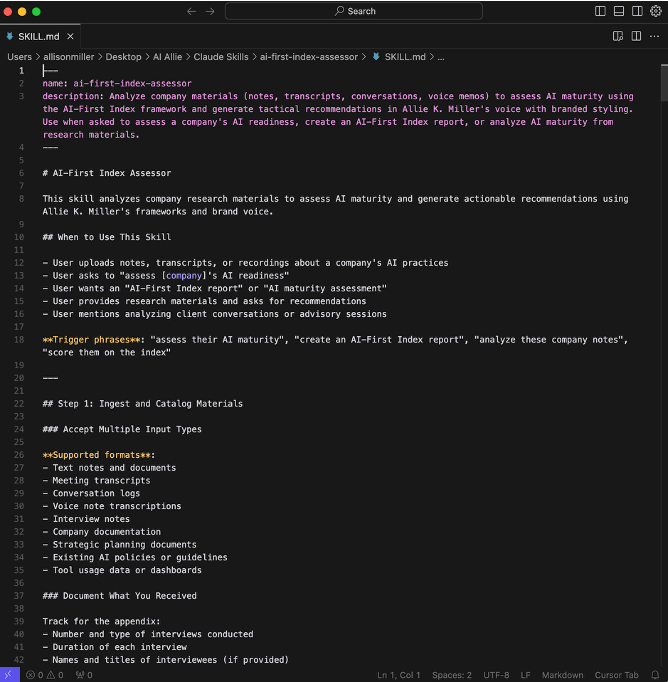
Claude Skill example: AI-First Index Assessment by Allie K. Miller
And here is another skill example. This one is an AI use case generator that leverages my own structure and frameworks. This one is 90% shorter than the AI-First Index skill and is only 73 lines long.
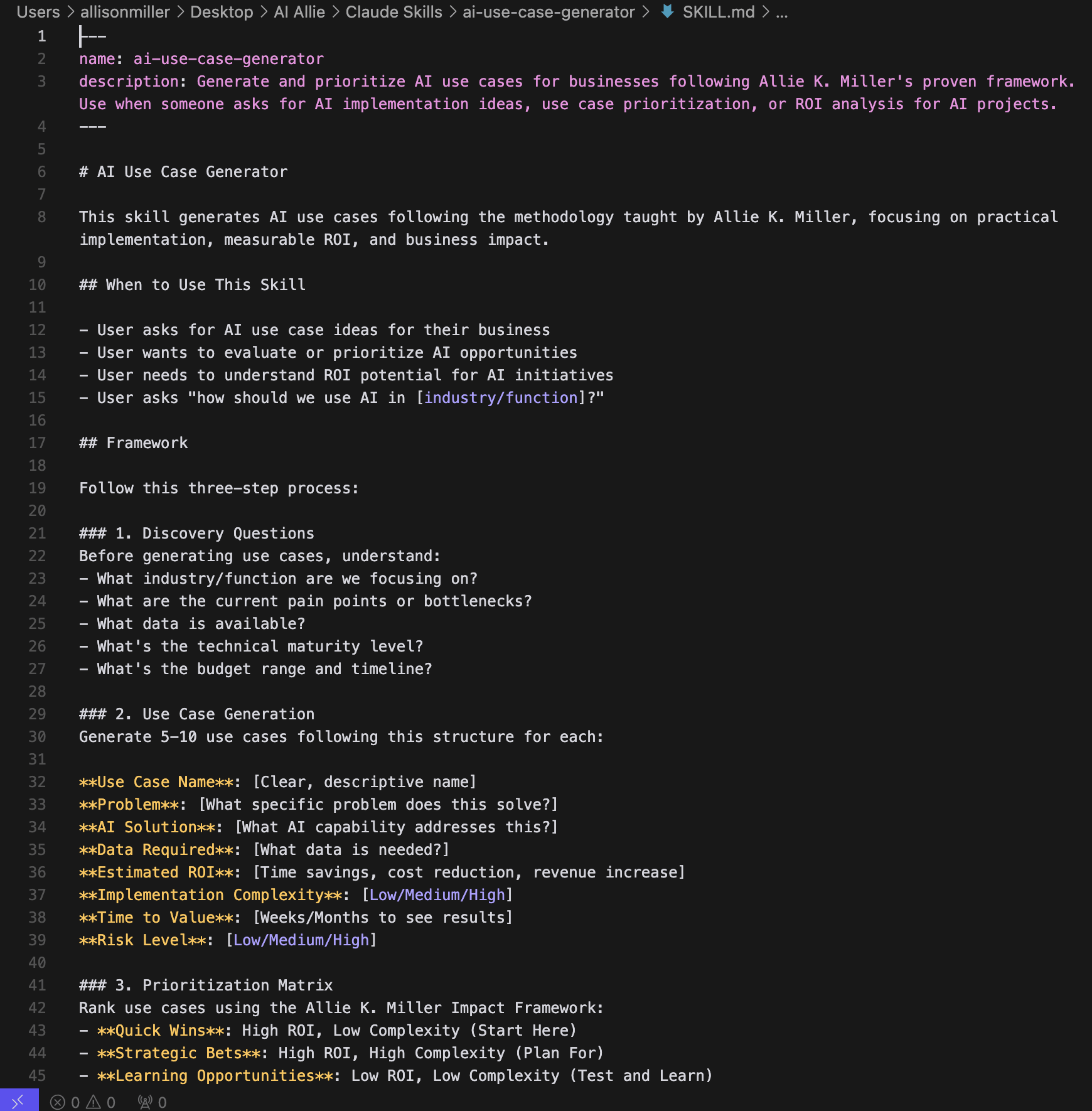
Claude Skill example: AI Use Case Generator by Allie K. Miller
If you have reference docs Claude should pull from, create a references (references/) folder inside of your main folder and drop them in. This might include things like brand guidelines, brand voice, goal planning documents, company writing guidelines, company AI policies, etc. You’re going to do the same with code scripts (scripts/) or templates and images (assets/) that you might need.
Then you are going to go to your master folder (the one that includes your SKILL.md file and all the other folders we just mentioned), right click, hit ‘compress’ to create a zip file, then upload that zip file in Claude Settings > Capabilities > Skills > Upload skill. You did it! You just created your very own skill. And to that I give you a resounding hell yes.

Quick naming tip: Name your skill something you'll remember, like a noun for what it does. "Sephora Design Style" and not "Debbie the Designer." You need to have the right skill on speed dial. For the name, you have to use lowercase letters, numbers, and hyphens only (max 64 characters).
Remember: You Can Customize Everything
This is the part people forget. A skill isn't just "complete this task." You can control exactly how the output looks and how Claude communicates with you along the way. Claude only reads the files and folders it needs so you don’t waste your context window and confuse Claude along the way.
As an example, here are some things you might bake into your new Team Decision Matrix skill:
Return all relevant parties based on my org structure document
Make me a spreadsheet based on a specific Excel format I provide, and remind Claude to always make my headers green
Require that the first tab is always a summary of the analysis and provide a layout for that
Have Claude provide its assumptions in the third tab
After every major decision, Claude shares back: the decision it made, why it made it, the assumptions going in, alternative options it considered, trade-offs between those alternatives, why it picked what it picked, open questions it didn't answer, confidence scores, and next actions for me to take
That last one (the judgment checkpoint) is game-changing for complex workflows. You stay in control without micromanaging every step. The Anthropic team has provided a whole document of Claude Skills best practices here. You can create a skill, upload the skill into a Claude chat, paste in the best practices text from the link above, and ask Claude for any updates/edits/feedback. Everything is context, people! Grab, grab, grab.

Claude Skills Best Practices Worth Stealing
There are so many best practices that I love when it comes to Claude Skills. One is Claude performing its own feedback loop. Here is an example of that for a marketing or design skill that reviews assets against a style guide:
## Content review process

1. Draft your content following the guidelines in STYLE_GUIDE.md
2. Review against the checklist:
   - Check terminology consistency
   - Verify examples follow the standard format
   - Confirm all required sections are present
3. If issues found:
   - Note each issue with specific section reference
   - Revise the content
   - Review the checklist again
4. Only proceed when all requirements are met
5. Finalize and save the document
Another tip I've seen circulating in the agent developer community (sometimes attributed to OpenAI's work on agents.md) is to group your agent instructions into three categories:
Always do (no questions asked)
Ask first (check with me before proceeding)
Never do (omg please never do this)
Breaking things into those buckets may make your skill more reliable, but you should always test before proceeding.
Some Starter Skills to Try
Not sure what skill to build? Here are some that people love making:
Brand guidelines – Feed it your brand kit, colors, logo, the checks you'd normally run. Now every piece of content is on-brand without you manually reviewing.
Common assessments and analysis – Like my AI-First Index Assessment. Whatever analysis you run repeatedly, skill it once.
"How to write like me" – I have one with different considerations for how to talk to executives vs builders vs entrepreneurs. The skill pulls from the right section based on context.
Front-end design – This one's already built into Claude. If you're creating a game or interactive prototype, explicitly ask Claude to use its front-end design skill. Sometimes you have to call it by name.
The Big Picture: Why This Matters
Simon Willison tweeted that Skills might be more important than MCP. I agree.

Maybe we're not going to be managing 1,000 different agents. Maybe there's a master agent that doles out tasks to sub-agents, and all of them tap into a shared suite of skills. Think of it like a handyman who already has a hammer and pliers, but can also grab a wrench or screwdriver from his toolbox when the job requires it.
Instead of building 100 different agents, you leverage one agent (or very few) with access to a set of skills and tools. At runtime (aka when you ask it or when it calls itself), your agent will decide whether it needs a skill, whether it already has one built in, whether you've provided it, whether it needs to make one, or whether it simply can't complete the task.
I believe we will also see more multi-skill stacking. Maybe you start with a brainstorm skill, then a productization skill, then a prototyping and front-end design skill - all in the same conversation. Skills that hand off to each other, so to speak.
Claude Skills: Your To-Do List
Here's how you can get started this week:
Make sure Skills are on. Settings > Capabilities > Skills section > toggle on
Use a pre-built skill first. Ask Claude to create a spreadsheet or PowerPoint. Watch it call the skill in the conversation so you see how it works
Do that twice. Make sure to really get a feel for it
Go to a favorite thread. Ask Claude to turn it into its own skill using the prompt I gave you above
Upload that zip file into Settings > Capabilities
Call that skill and use it. See it in action
Build a second skill. Keep testing
Try stacking two skills in the same conversation thread
Have a conversation with your team about the interaction layers between agents, skills, conversations, and people
That last one is sneaky important. This is where the culture shift happens. Enjoy building your next Claude Skill, and let me know how it goes.
As always: stay curious, stay informed,
Allie

Inside AI-First Academy, we not only cover prompting, multimodal features, delegating work to AI, and upleveling your career, we go deeper on building Skills for complex business workflows so you can plan for stronger, better, faster workflows with AI agents.
You’ll learn how to:
✔ Build custom GPTs and reusable AI workflows
✔ Automate reports, research, and meeting synthesis
✔ Prototype AI-powered tools—no coding required
✔ Leverage the best of today’s AI agents - including Claude Skills, ChatGPT Atlas, and ChatGPT Agent mode - with instant access to the 90-minute Agentic AI Workshop (just added last week)
Learn more AI through Allie’s socials