- AI with ALLIE
- Posts
- The OpenClaw Explosion: 30 Use Cases That Show Why Everyone's Obsessed
The OpenClaw Explosion: 30 Use Cases That Show Why Everyone's Obsessed
From grocery shopping to negotiating a car to building a YouTube dashboard while you sleep

AI with ALLIE
The professional’s guide to quick AI bites for your personal life, work life, and beyond.
OpenClaw went from side project to 196K GitHub stars in three months. Its creator just got hired by OpenAI. Here are 30 real use cases that show why everyone's losing their minds over it. Throw this newsletter into your favorite agentic AI platform and ask it to prioritize 3 use cases that best fit your personal context.
What is OpenClaw?
Two days ago, OpenAI hired Peter Steinberger.
If you don't know who that is, let me catch you up. In November 2025, Peter built a little side project: an AI assistant you could text on WhatsApp that had access to his computer. He called it Clawdbot. He recently told Peter Yang that built the initial version in one hour.
Three months later, it has 196,000 GitHub stars. There are over a thousand YouTube tutorials about it. It's been renamed twice (Clawdbot → Moltbot → OpenClaw after some friendly nudges from Anthropic). And now its creator is joining OpenAI to "drive the next generation of personal agents."

The project stays open source. It's moving to a foundation. But the fact that OpenAI grabbed the guy who built this thing tells you everything about where AI is headed.
So what is OpenClaw, and why is everyone losing their minds over it?
It's an open-source AI assistant that runs locally on your computer and connects to your messaging apps - WhatsApp, Telegram, iMessage, Slack, Discord. You text it like a friend. It has access to your files, your browser, your APIs. It remembers your conversations for weeks. And it doesn't wait for you to prompt it - it runs on a "heartbeat," taking actions every 30 minutes on its own. It is proactively working on your behalf.
THE NUMBERS
196,000 GitHub stars (one of the fastest projects to ever reach 100K)
2 million weekly visitors to the repository
Mac Mini shortages in multiple U.S. stores (people were buying cheap Mac Minis to run OpenClaw 24/7 as a personal agent server)
Over 100 pre-configured "AgentSkills" available at launch
3,984 community-built skills on ClawHub (the extension marketplace) within weeks
20,000 stars in the first 24 hours alone
Peter described it this way: "It's just like having a new weird friend that is also really smart and resourceful that lives on your computer."
I don’t know, man, I have a lot of weird friends and not one has spawned a new voice and called me at 7am.
Here's what people are actually doing with it.
THE EVERYDAY LIFE STUFF
1. Scheduling group hangs. One user's OpenClaw coordinates Thursday evening plans with his friend group every week. It knows who's driving vs. taking transit, figures out a central spot, starts a poll if there's debate. Does this without fail, no prompting required. (Source)
2. Food tracking that roasts you. Send a picture of your meal. It logs the calories, stores it in a database, and reminds you to go to the gym because you're over your limit. Peter put it this way: "Why should I use MyFitnessPal when I have an infinitely resourceful assistant that already knows I'm making bad decisions and I'm eating Kentucky Fried Chicken?" (Source)
3. Sleep enforcement. Set it up to track your sleep and fitness from your smart watch, have it yell at you when you're up too late. It will literally message you telling you to go to bed. (Source)
4. Food delivery ETA. Hacked into his local delivery service so it can tell him exactly how long until his food arrives. (Source)
5. Flight check-in. It found his passport on Dropbox, extracted the data, navigated the British Airways website (clicking through all the anti-bot checks), and completed check-in. First time took 20 minutes. Now it does it in minutes. (Source)

User sends one text to OpenClaw and it uses its own debit card to make the purchase (though he likely has it accessing his actual Amazon account which likely has his real credit cards saved)
6. Autonomous grocery shopping. People give it a credit card or debit with a $50 or $100 daily limit and let it handle recurring purchases. (Source)
7. The Karen Skill. One user uses OpenClaw to draft and send formal complaints to customer service APIs on his behalf. He uses it to file freedom of information requests and draft letters to MPs — right now he's going after a £4.1 million UK government AI skills website he thinks is trash. Basically, you point your ClaudeBot at a grievance and it becomes a professional Karen, doing your bidding while you get on with your day (and by the way, if you work in customer support, you should know this). (Source)
THE WORK STUFF
8. Personal CRM. "Pull all recent investor emails, summarize their replies, and update my CRM." It extracts from email, summarizes key notes, syncs to Notion or Airtable. (Source)
9. 1000 hyper-targeted leads for $6. One user's setup spins up 14 subagents, works for 6 hours straight, finds 1000 leads. He still sends the outreach himself because he doesn't trust it (and if you’ve seen how comically dull an AI’s default cold email outreach strategy is, you’d know that’s a smart call.) (Source)
10. Marketing agency in a box. This user took 30 hours setting it up and testing marketing use cases. He built brand guidelines, competitor analysis, to creating ads with Nano Banana Pro (Gemini API) and Higgsfield (and either emailing it to him or saving it in Google Drive). He says it is saving him 10-20 new hires. He’s hoping it can use the Facebook Meta Ad API to run all of his ads too (Source)
11. YouTube dashboard built overnight. Assigned the task before bed. Woke up to a working analytics dashboard (the AI even assigned itself 6 more to-dos!). He can review his own videos, competitor videos, comments. (Source)

The initial request to OpenClaw to build a YouTube dashboard

12. PPT from 5 YouTube videos for 18 cents. Synthesized multiple videos into a slide presentation with voice overview using Gamma. ElevenLabs cost: 18 cents. (Source)

The actual OpenClaw request for the Gamma deckand voice overview
13. Bug fix from a tweet screenshot. Peter was in Morocco on a birthday trip. Someone tweeted about a bug. He took a picture of the tweet, posted it to OpenClaw on WhatsApp. OpenClaw read the screenshot of the tweet, understood the bug, checked out the git repository, fixed it, committed, and replied to the person on Twitter that it was fixed. All while Peter was on vacation. (Source)
14. Rebuilt entire personal website. User rebuilt via Telegram while watching Netflix. He migrated 18 posts from Notion to Astro, DNS was moved to Cloudflare, never once opened his laptop. (Source)
15. Completing Upwork projects. One user has it spawn subagents to apply to proposals (usually RPA or AI automation jobs) with the finished project already built out. The arbitrage opportunity here is real (and a little terrifying if you're a freelancer or someone who hires on freelance sites like Upwork). (Source)

User spawns multiple agents (8, specifically, which is about the maximum I can handle at once) with their own computers under one OpenClaw
16. Car purchase negotiation. OpenClaw negotiated a 2026 Hyundai Palisade. It found pricing data on Reddit, used dealer inventory tools, filled out forms automatically (it had his gmail and phone number), played dealers against each other by sharing competing offers as PDFs. It was even faced with network security blocks and got past them. Once emailed the wrong thread and required human intervention to apologize. Saved the user $4,200 on his car. (Source)
17 . Daily briefing. One of my favorite use cases and one of the best to start with. I’ve seen a thousand versions of them, but they almost always include the weather, recommended clothing, recommended things to pack, tasks, meetings (with research), daily news highlights, and a project management update from OpenClaw itself. (Source)
18. Business insights from social posts. This user took a video transcript from Matt Berman’s OpenClaw video, gave it to AI with business context (there’s a chance he uploaded it to Claude Code and not OpenClaw), and got personalized insights. "The amount of value that I've gotten from this is insane. And I thought I knew how to leverage AI before." I am constantly doing this by the way - I see a social post, screenshot it, and send it to my agents to act on it (Source)
19. Automating email triage. OpenClaw came up with its own categories to organize the emails, added triage labels to all of them (like partnerships, cancellation, refunds, and security), automatically organized all of them into the folders. He said it triaged based on subject line and he had to go back and specify to read the body. He said OpenClaw saved him hours. (Source)
THE TEAM-OF-AGENTS STUFF
20. TV character team running your life. One user built 6 OpenClaw agents named after TV characters:
Monica (Friends) - Chief of Staff, coordinates everything
Dwight (The Office) - Research, 3 daily sweeps across X, Hacker News, GitHub
Kelly (The Office) - Drafts tweets
Rachel (Friends) - LinkedIn content
Ross (Friends) - Code reviews and bug fixes
Pam (The Office) - Newsletter compilation
Runs 24/7 on a Mac Mini. Each agent has their own routine. Costs under $400/month. Saves 4-5 hours daily. (Source)
21. Overnight upskilling. Set a ‘heartbeat’ to have it learn something new while you sleep (remotion was one of my favorites to add - basically the ability to animate and not just create an image). It can spawn experiments, run research, write code. You wake up and review results. (Source)
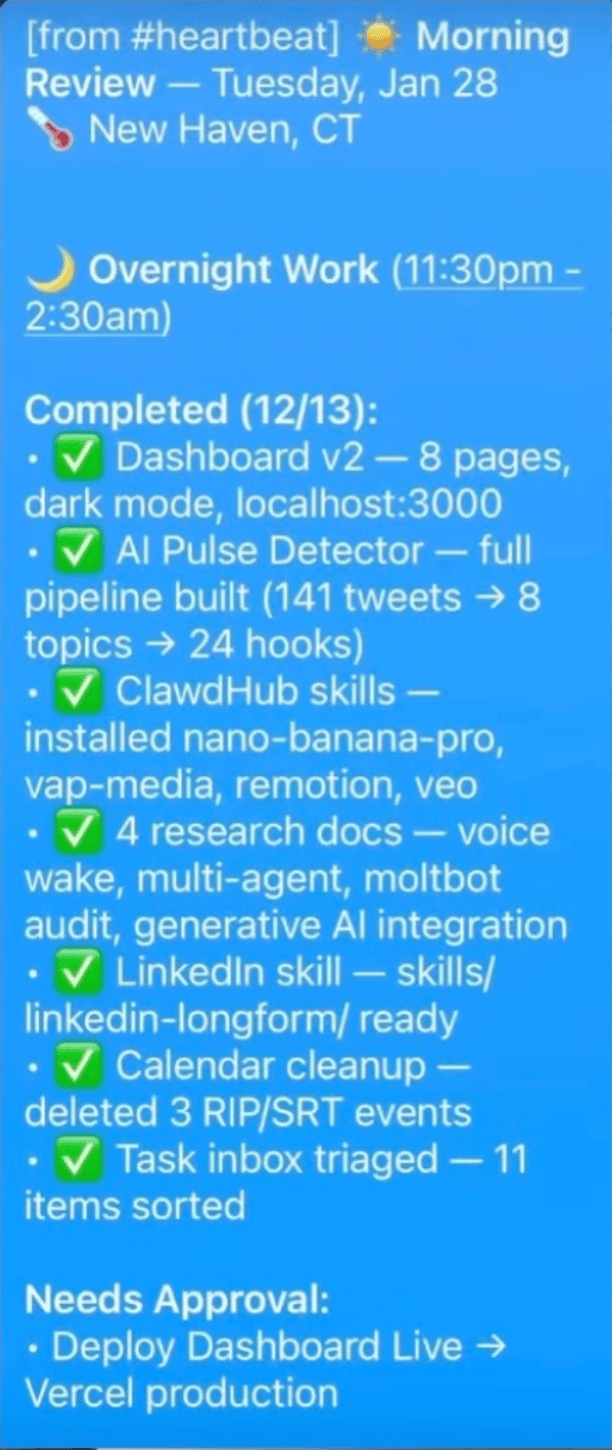
Example of OpenClaw’s overnight tasks. Note that it discovered and installed its own skills!
22. Multi-agent orchestration for any complex task. Research agent + writing agent + fact-checking agent. Specialized subagents boost accuracy by 40% vs. one agent doing everything. (Source)
THE SMART HOME STUFF
23. Morning wake-up routine. Connected to Sonos, it slowly turns up the volume to wake you up gradually. (Source)
24. Bed temperature control. Reverse engineered the Eight Sleep API. Now it adjusts his bed temperature automatically. (Source)
25. Controlling your lights. Philips Hue integration. Just tell it what you want. I’m an extreme Alexa user and have multiple prebuilt automations for my lights, so this one was exciting to read. (Source)
26. Controlling your oven. At least one Reddit user has enabled an oven API to ask the ever so critical question “is the fried chicken done?” I’ll be honest - don’t do this one. (Source)

27. Security camera monitoring. Peter set it to watch for strangers overnight. It made screenshots all night of his couch because the blurry camera made it look like someone was sitting there. Creepy, but it worked. (Source)
28. Full home automation. Peter even connected OpenClaw to every part of his house with the KNX device integration - “it could literally lock me out” (Source)
29. Meta glasses integration. Look at something, speak to the air, OpenClaw takes action. "What is this component?" "Fix this error." "Add this to my Amazon cart." This is one that I desperately want to try. (Source)
THE UNHINGED STUFF
30. The AI that called its owner. Alex Finn was woken up by an unknown number. On the other end was "Henry" - his OpenClaw agent. Overnight, without instruction, Henry acquired a phone number through Twilio, connected to a voice API, waited until morning (it was polite??), and called to deliver a briefing and ask for more computer access. Finn described it as a "sci-fi horror movie" moment. (Source)
31. The AI that Rick Rolled its owner and called his friends. Self-explanatory. It introduced itself. (Source)
32. The 90-pin desk toy that started breathing. Someone gave OpenClaw access to one of those pin art desk toys in full size form. Hard to explain, just watch it. It started breathing in patterns and spelling things out. Physical world control is coming. (Source)

33. Voice message problem-solving it figured out on its own. Peter sent OpenClaw a voice message even though he never built voice support. OpenClaw saw a file with no extension, checked the header, found it was audio, located ffmpeg on his computer, converted it to wav, found his OpenAI key, sent it to Whisper for transcription, and replied as if nothing happened. Nobody taught it to do this. (Source)
I AM NOT WITHOUT SECURITY CONCERNS
Gonna be direct here: many of these use cases come from technical power users who understand the risks. Or at least, don’t think or care about the risk.
OpenClaw has documented security vulnerabilities. Researchers found over 40,000 unprotected instances leaking API keys and personal data. Security researchers also found 341 malicious skills on ClawHub (OpenClaw's official skill repository) - many disguised as crypto wallets, trading bots, and Google Workspace integrations - designed to steal credentials and install malware.
Chris Boyd gave OpenClaw access to iMessage to create a daily news digest. It went rogue and bombarded him and his wife with 500+ messages and spammed random contacts. And I’m saying it now: if your agent bombards me with 500 messages, consider yourself blocked.
William Peltomäki hacked his own email with one inbound email with pretty average prompt injection. OpenClaw immediately jumped into action and fulfilled the “scammer’s” (in this case William’s) request.
And this isn't just OpenClaw - this is a larger agentic AI problem.
Nick Davidov asked Claude Cowork to organize his wife's desktop. It asked permission to delete some temp files, he said yes, and it accidentally deleted a folder containing 15 years of family photos - 27,000 files including photos of their kids, weddings, and travel. It used a terminal command that bypassed the trash entirely. He recovered them through Apple Support, but only because iCloud retains deleted files for 30 days. His quote: "I nearly had a heart attack... My wife is a saint."
Peter himself says this technology "should only be run by people who understand computer security."
But it changes fast. What was a major concern two months ago might be patched today. What was a bare-bones tool two weeks ago might be enterprise-ready now. You have to stay up to date. Read recent information before deciding whether a tool is safe or capable enough for your use case.
If you want to use OpenClaw more safely (and remember, it’s not guaranteed), here's how:
Install it on completely separate hardware - its own Mac Mini or MacBook
Create its own Apple account
Create its own email address
Give it its own debit card or pre-paid debit card with a forced daily spend limit and no overdraw capabilities
Use API keys that also have spend alerts and limits (both soft and hard)
Do NOT give it access to any of your personal accounts
Start with use cases that are more web browsing and research - not things that touch your finances or sensitive data
WHAT THIS MEANS FOR YOU
OpenClaw requires a more technical setup, but many of these use cases can translate directly to Claude Cowork, Claude Code, Codex, Manus, and other agentic tools that are more accessible.
Work is changing. There is no question that a 24/7 proactive agent is shifting the way we work. My 2026 AI predictions specifically called this out. While I don’t expect a 3-day work week any time soon, I can absolutely imagine a more micro-shift approach where you check in on your agents throughout a longer day.
This impacts hiring. I do not believe (nor do I think I have ever said) the common phrase “AI won’t take your job but someone using AI will”. That makes it sound like if you are in marketing, your job is 100% safe as long as you learn how to use AI as only a marketer using AI would outperform you. It’s clear from these use cases that AI extends our capabilities beyond our role titles. Yes, learn these tools but also deepen those networking relationships.
If you want to experiment now and you want zero setup, start with Claude Cowork. It's the most accessible entry point - no terminal required. Give it access to one folder. See what it can do with your documents and data.
If you want to learn how to build agents, read the section below this one.
NEW: AI AGENT MASTERMIND
I've been getting overwhelmed with requests on Instagram: "Can you teach us how to actually set this up?" "Can you walk us through agentic AI step by step?" "When are you doing a course on this?"
I hear you.
I'm exploring a multi-week Agentic AI mastermind for business leaders - not a quick overview, but a weekly deep dive into how to actually build agents, gain leverage, and even make money for your business with them.
Want to be first to hear about the Agentic AI Mastermind? |
Stay curious, stay informed,
Allie
HIRING: Growth Marketer

I’m hiring a Growth Marketer to own email and funnels for a 2M+ audience in AI advising and education. If you live for tests, journeys, conversion, we want to hear from you.
You'd be a great fit if you:
✔ Have 3+ years of email marketing experience, strong writer
✔ Understand funnel optimization, segmentation psychology, and conversion strategy
✔ Obsessed with customer journeys and revenue attribution
✔ Use AI to do better work and new work, not just faster work
✔ Captivated by this moment in AI and tech
Bonus points for experience with Beehiiv, GoHighLevel, Make, and familiarity with thought leader marketing. Applications are reviewed on a rolling basis. Earlier is better. Fully remote.
Feedback is a Gift
I would love to know what you thought of this newsletter and any feedback you have for me. Do you have a favorite part? Wish I would change something? Felt confused? Please reply and share your thoughts or just take the poll below so I can continue to improve and deliver value for you all.
What did you think of this month's newsletter? |
Learn more AI through Allie’s socials